
For years, the answer to "does Google Cloud Storage speak SFTP" was no. On August 26, 2026, it became yes. The service is called Cloud FTP. It costs $0.30 for every hour it exists, and it signs your partners in with SSH keys and nothing else.
The scenario has not changed. A partner sends a two line email: here is our SFTP client, where do we connect? Your data lives in a bucket. Until this summer you had two answers. Run a virtual machine, or rent somebody else's gateway. Now there is a third, and it comes from Google.
We like that it exists. It removes a server most teams never wanted to run. It also has edges that the launch notes do not dwell on, and they are the kind you want to find before your partner does. This article walks through them in order: the price, the sign-in, what the endpoint can do, where it runs, and what it writes down.
One note before we start. Plenty of guides still say Google Cloud has no managed SFTP, and that SFTP on GCP means building a server in front of a GCS bucket. They were right when they were written.
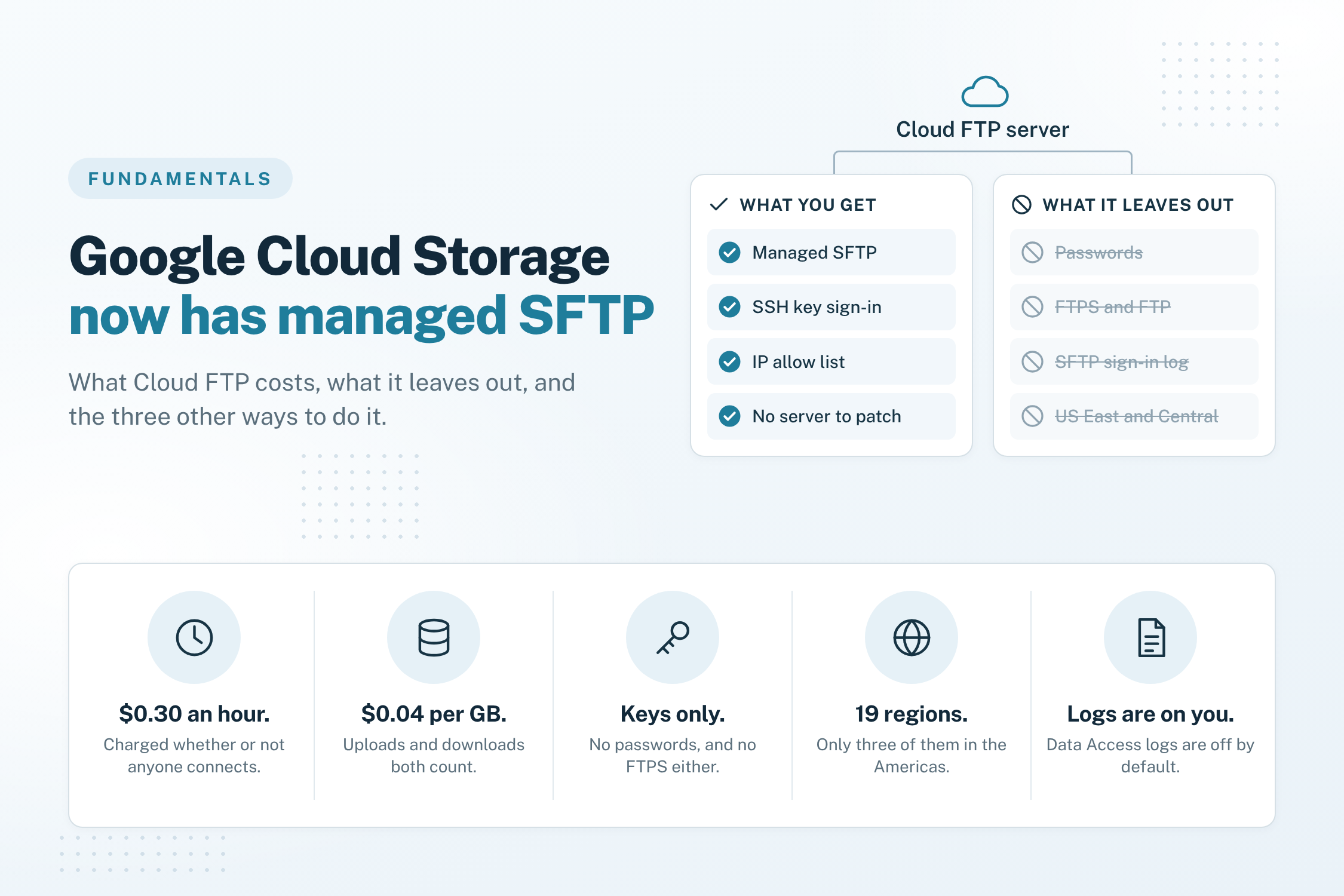
What Cloud FTP is, in one minute
Cloud FTP is a managed SFTP server that Google runs in front of your Cloud Storage buckets. It is Google Cloud Platform's own answer to AWS Transfer Family. Your partners connect with the clients they already have. Google's documentation names Cyberduck, FileZilla, OpenSSH, PuTTY and WinSCP. Files they upload land in the bucket as ordinary objects, ready for BigQuery or whatever reads the bucket next.
A server comes in one of two types, and you choose when you create it. An external server has a public IP address and accepts connections only from the IP ranges you list. An internal server is reachable only from inside your network, through Private Service Connect. The type cannot be changed later.
Creating one is a single command.
gcloud services enable ftp.googleapis.com

gcloud alpha storage ftp servers create SERVER_ID \
  --access-type=EXTERNAL \
  --location=LOCATION_ID \
  --allowed-cidr-blocks=CIDR_BLOCK
Creates an external Cloud FTP server. Google says to allow about ten minutes for it to finish.
Two things in that command deserve a second look. The word alpha is still there, three months after general availability. And the name is slightly misleading. Cloud FTP speaks SFTP. The documentation does not describe FTP or FTPS at all. If you searched for Google Cloud FTP hoping to serve an old FTPS client, this is not that.
The service is moving quickly. It added eight regions on October 30, and console controls for starting, stopping and deleting servers arrived on November 6. Everything we say here is true as of November 20, 2026.
Cloud FTP pricing: you pay for the server to exist
Cloud FTP pricing has two meters.
Server uptime: $0.30 an hour. That is $216 for a 30 day month and $2,628 for a year, whether or not anyone connects.
Data: $0.04 per GB, in both directions. Uploads count. Downloads count.
Google's own first example is 20 users who download 1 GB a day. The bill is $217.20 a month, and $216 of it is the server standing there. Users are not a billed unit, so 20 partners and 1,000 partners cost the same until they move data.
If those numbers look familiar, they should. AWS Transfer Family charges the same $0.30 an hour and $0.04 per GB, and native SFTP on Azure Blob Storage carries the same hourly rate. All three big clouds have landed on one price for keeping an SFTP door open.
The two meters are not the whole bill. The pricing page also lists the usual Cloud Storage charges for requests, storage and outbound data transfer, plus Secret Manager, Cloud DNS, logging and, for internal servers, Private Service Connect.
There is one lever. You can stop a server, and Google suggests doing so when no transfers are expected, to reduce uptime cost. Read the fine print first. Stopping drops every active transfer and refuses new connections, and starting again takes a few minutes. That suits a nightly internal job. It does not suit a partner who connects whenever their own schedule says so.
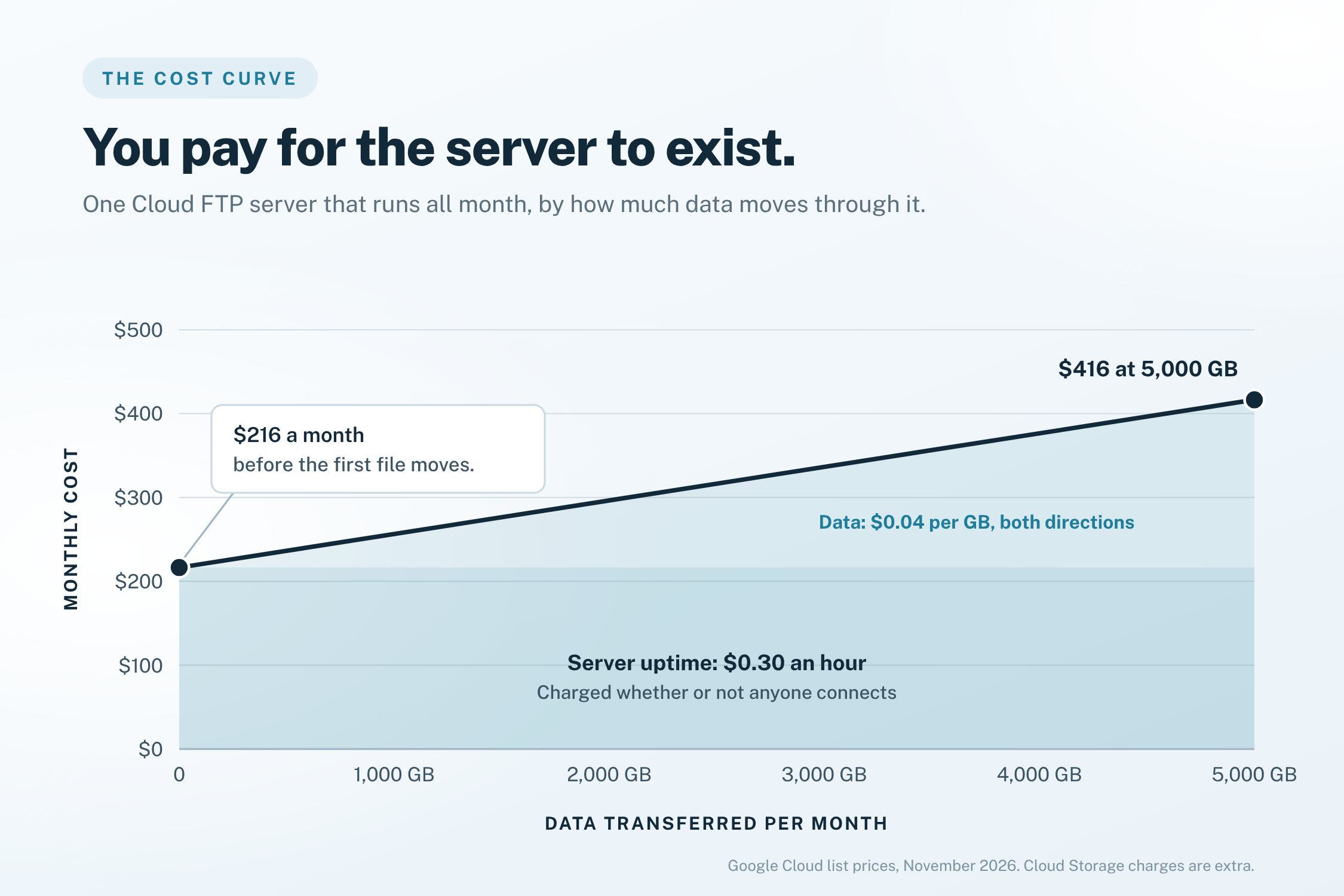
Cloud FTP charges for the server's existence. The line starts at $216 a month before the first file moves.
Sign-in is SSH keys, and nothing else
A Cloud FTP user authenticates with an SSH public key. Each user can hold up to 10 keys. Google's connection guide tells users to leave the password field empty, and we found no password option anywhere in the documentation.
For security, this is the right default. Password guessing never went away, and we have written about how distributed attacks slip past lockouts. A server with no passwords has nothing to guess.
For compatibility, it is a hard line. Some partner systems can only sign in with a username and a password. Some require FTPS, because that is what their software was built around. Cloud FTP cannot serve either one, and no setting changes that.
Every SFTP user is a service account
Behind each SFTP user sits a Google Cloud service account that you create. The service account is what reads and writes the bucket. Google recommends one dedicated service account per user, and it is good advice.
It also means that onboarding a partner is IAM work. For one new user, five things have to line up.
The partner's IP address falls inside one of the server's allowed ranges.
The partner's public key matches a key on the SFTP user.
The Cloud FTP service agent holds the Service Account Token Creator role on the user's service account.
The service account holds Storage Object Viewer on the bucket, or Storage Object Admin if the partner needs to write.
The user's directory mapping is set to read only or to read and write, as you intended.
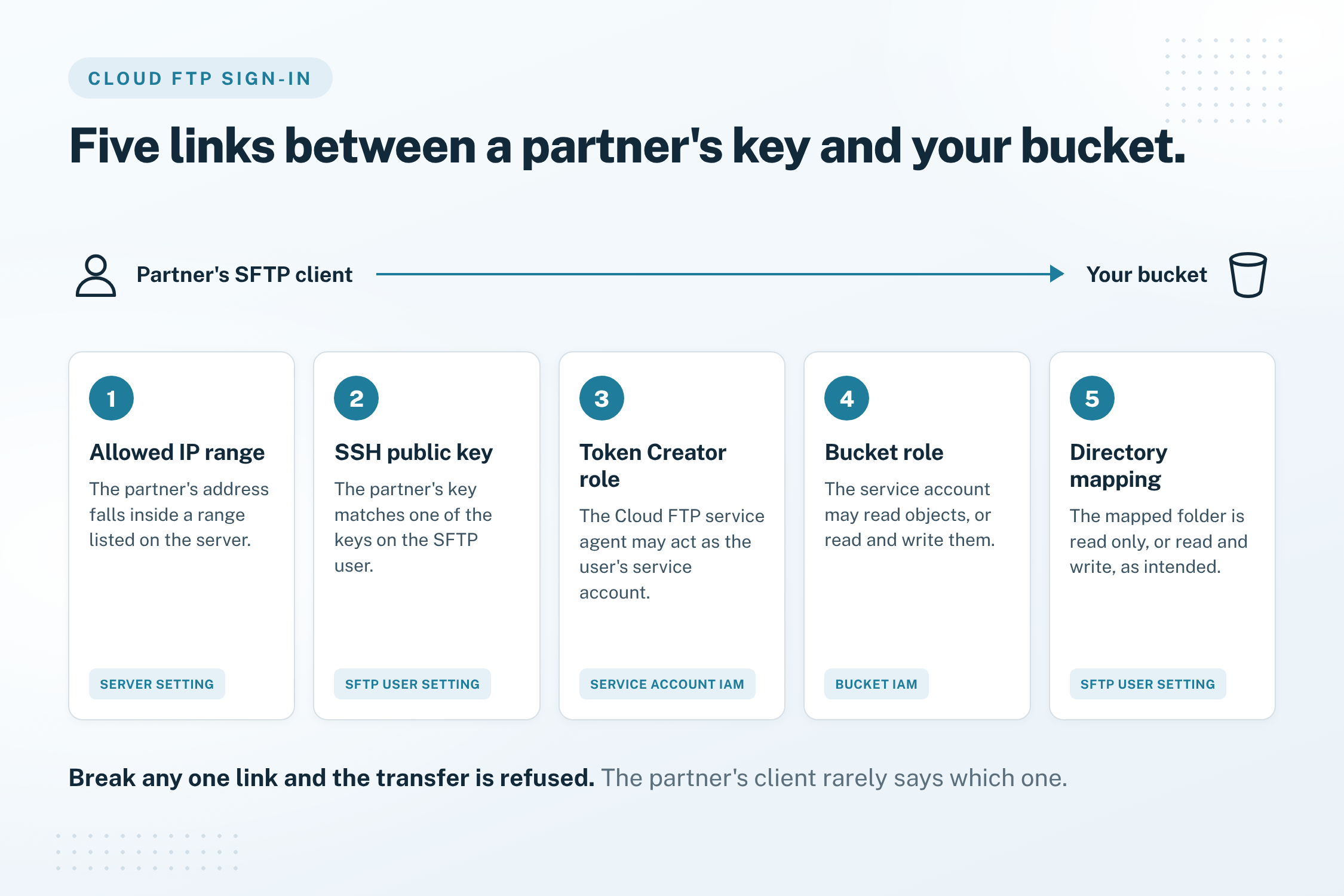
Five links between a partner's key and your bucket. The partner's client rarely says which one broke.
Miss any link and the partner gets a refusal. If you have ever searched for Google Cloud SFTP permission denied, these five are the first place to look. With five partners it is a checklist. With fifty it is a process that needs an owner.
Cloud FTP limits: what the endpoint can and cannot do
Cloud FTP has no adjustable quotas. Google's limits page describes its limits as fixed values that cannot be changed, so read them before you design around the service.
| Limit | Fixed value |
|---|---|
| Concurrent sessions per server | 500 |
| File size per transfer | 750 GB |
| Buckets or folders mapped to one user | 10 |
| SSH public keys per user | 10 |
| Allowed IP ranges per external server | 500 |
| Servers per project | 1,024 |
For most teams those ceilings are generous. The behavior of the storage underneath deserves more attention.
- Rename has conditions. The supported commands include rename, but a file can only be renamed from the current directory, and renaming a directory works only on a bucket created with hierarchical namespace. That setting cannot be turned on for an existing bucket. If a partner's software uploads into a temporary folder and then moves the folder into place, test it before you promise anything.
- Mapped folders cannot nest. Each user sees up to 10 mapped locations, and one cannot sit inside another.
/inboundand/outboundwork together./reportsand/reports/archiveas two separate mappings do not. - Sessions can drop during upgrades. Google's own best practice is to enable automatic retries in the SFTP client, because infrastructure upgrades can disconnect a session. A scripted client that does not retry will need a human.
Where it runs: 19 regions, three of them in the Americas
Cloud FTP is not available everywhere Cloud Storage is. The locations page lists 19 regions today: eight in Asia Pacific, seven in Europe, one in the Middle East and three in the Americas. The three are Dallas (us-south1), Oregon (us-west1) and Los Angeles (us-west2).
Iowa, South Carolina and Northern Virginia are not on the list. Google's advice is to create the server in the bucket's own region for the fastest transfers, and in the nearest available region when the bucket's region is not supported. If your bucket lives in us-central1 or us-east4, that means a server somewhere else, and every file travels the distance between them.
To see where a bucket lives, run this.
gcloud storage buckets describe gs://BUCKET_NAME \
  --format="value(location)"
Prints the bucket's location, for example US-WEST1. Compare it with Google's list of Cloud FTP regions.
What it writes down, and what it does not
This is the section to read if anyone will ever ask you to prove what happened.
Cloud FTP's own audit logs record administrative actions: a server created, a user added, a server stopped. They are a record of what your administrators did.
File activity is recorded by Cloud Storage, not by Cloud FTP. Each upload or download shows up as the Cloud Storage operation underneath it. Those entries are Data Access audit logs, and they are off by default. Until you turn them on, nothing records who read or wrote an object.
What we could not find in the documentation is a log of the SFTP session itself. Who connected, from which address, at what time, and which attempts failed. That is the log an auditor tends to ask for, and the one that tells you a stolen key is in use.
So turn Data Access logs on before the first partner connects. And keep to one service account per user. Each transfer runs as that service account, which is what lets you tell one partner's activity from another's.
Networking has one sharp edge
An external server must be given at least one allowed IP range, and it accepts up to 500. That is a sound design. An endpoint that answers to the whole internet gets found quickly, as we covered in our checklist.
The sharp edge is that the list belongs to the server. We found no per-user IP setting. Every partner's range sits on the same list, so partner A's network is also allowed to knock with partner B's username. The key still has to match, so this is not an open door. It is a wider one than a per-user rule would give you.
The other temptation is 0.0.0.0/0, which Google documents as the way to allow every address. A partner whose IP addresses keep changing will ask for it on day one.
Two smaller notes. Support for VPC Service Controls was released in Preview, so check its status before you rely on it. And Cloud FTP servers are not indexed in Cloud Asset Inventory, which matters if that is how your security team counts what is exposed.
The other three ways to do SFTP on Google Cloud
Cloud FTP is the fourth way to put SFTP in front of a bucket. The other three have not gone anywhere.
Run your own on Compute Engine. A small virtual machine runs an SFTP server and writes to the GCS bucket, either through Cloud Storage FUSE or with a server that talks to Cloud Storage directly, such as the open source SFTPGo. The hardware is cheap. An e2-small is about $12 a month, and its public IPv4 address is $0.005 an hour, about $3.60 more. What you take on is everything else: patching, the inbound firewall rule, monitoring, and the rest of the list. If you mount the bucket, remember Google's own warning that Cloud Storage FUSE is not POSIX compliant. It has no file locking, and it uploads a whole file again to change part of it.
Deploy a gateway image from Google Cloud Marketplace. This is the same virtual machine with the software already installed and a management screen on top. One example, SFTP Gateway, lists $0.08 an hour for its Standard edition, which covers up to 5 SFTP users, plus the cost of the machine. You still own a server in your project.
Use a hosted service that fronts your bucket. Nothing runs in your project, and passwords, FTPS and a browser upload page usually come included. Look closely at one thing: how the service reaches your bucket. The ones we looked at ask you to create a service account key file and hand it over. Google is blunt about those keys. Its guidance is to avoid them whenever possible and never to pass them between people, because a key works for anyone who holds it.
The outbound connector design is a variation that removes that handover. A small agent runs inside your own project, keeps the bucket credential there, and dials out to the provider. The provider relays the session and never receives the credential. This is the model we built SFTP.cloud on, so weigh our opinion of it accordingly. Where your files actually live goes deeper on the differences.
The honest scoreboard
| Cloud FTP | Self-hosted VM | Hosted MFT | Outbound connector | |
|---|---|---|---|---|
| Endpoint cost | ~$216/mo per server | VM + IP, from ~$16/mo | Subscription | Subscription |
| Per GB charge | $0.04 in and out | None | Usually | Varies |
| Password sign-in | No | Yes | Usually | Usually |
| FTPS or FTPES available | No | Yes, you build it | Usually | Usually |
| Browser upload page | No | Build it | Usually included | Usually included |
| SFTP sign-in log | Not documented | You build it | Usually | Usually |
| Other storage behind the same endpoint | No | You build it | Usually | Usually |
| You patch the daemon | No | Yes | No | No |
| Inbound firewall rule | Google-hosted | Yes | Sometimes | No |
| Provider holds your files | No | No | Usually | Varies, verify |
| Provider holds storage credentials | No | No | Usually | Varies, verify |
Swipe to see all four columns.
Every column also pays Google's normal storage, request and outbound data transfer charges, so those cancel out.
Eleven rows, and Cloud FTP wins several of them outright. No server to patch. No inbound rule. No files or keys with a third party. If your partners all use SSH keys, connect from known addresses, and your bucket sits in a supported region, it is a good answer, and we would tell a customer so.
Four questions before you create a server
Can every partner sign in with an SSH key? One partner who needs a password or FTPS means a second system beside Cloud FTP. Ask before you build.
Is your bucket in one of the 19 regions? If not, decide whether a server in another region is acceptable, or whether the data should move.
Do partners connect on your schedule or theirs? If theirs, the server runs all year and the floor is $2,628 before data. If yours, stopping it between jobs changes the math.
Who has to prove what happened? If the answer is anyone, plan the Data Access logs and the one service account per user rule from the first day. Then decide what you will show when someone asks for sign-in history.
Worth checking today: run the bucket location command from earlier against the bucket you had in mind. If it prints a region on Google's Cloud FTP list, a server can sit right beside your data and the only question left is the $216. If it prints anything else, such as US-CENTRAL1, question two is still in front of you.
SFTP.cloud puts a managed SFTP, FTPS, FTPES and HTTPS endpoint in front of the storage you already own, Google Cloud Storage included, using an outbound Storage Connector you deploy in your own project. Your files are never written to our disks, and your bucket credential stays on your Connector. See how it works, or read the Google Cloud Storage integration detail.