
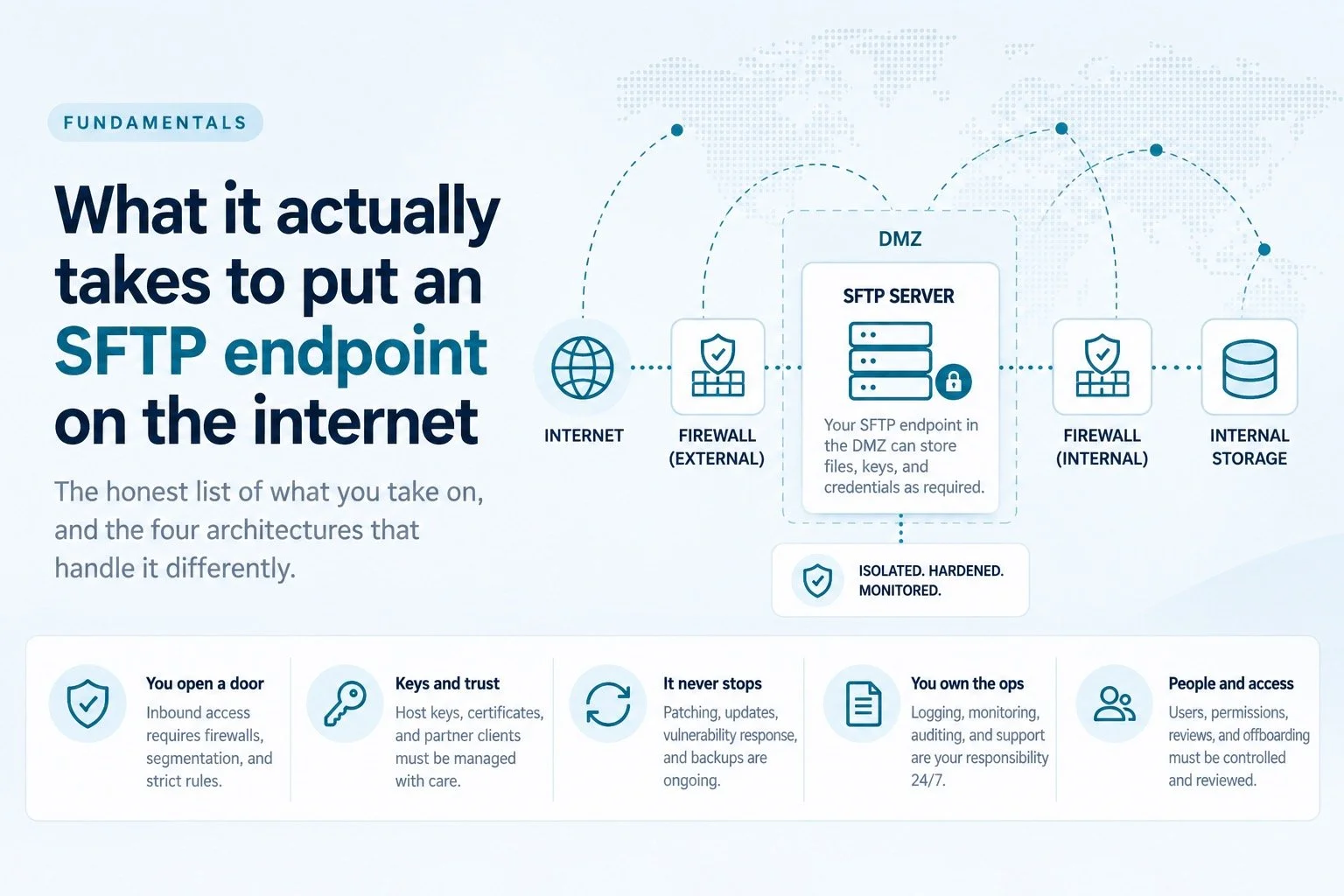
Installing the server is an afternoon. Everything after that is the job. Here is the honest list of what you take on, and the four architectures that handle it differently.
A partner needs to send you files. They've asked for SFTP, because SFTP is what everybody asks for. Someone forwards you the request and it reads like a small job.
Install a server. Create a user. Hand over a key. Done by lunch.
And honestly? For a box on your internal network, that is roughly the job. We're not going to pretend otherwise. sshd with internal-sftp and a chroot is a genuinely good piece of software, it's free, and for an internal transfer between two machines you control it is the correct answer. Anyone telling you that you need a commercial platform to move a file between two servers in the same rack is selling you something.
The trouble starts at the word internet.
What the afternoon actually buys you
Here's the config everyone pastes, and it's fine as far as it goes:
Match Group sftpusers
    ChrootDirectory /srv/sftp/%u
    ForceCommand internal-sftp -u 0027
    AllowTcpForwarding no
    X11Forwarding no
    PermitTunnel no
That gets you an isolated user who can move files and can't get a shell. It's the right shape. It also covers approximately none of what happens next, because the config file was never the hard part.
The hard part is that you've just agreed to operate an internet-facing authentication endpoint, indefinitely, for as long as that partner relationship lasts.
The list nobody puts in the ticket
You have to open a hole, and then defend it
An internet-facing SFTP server needs inbound TCP reachable from outside. That means a firewall rule, and if you're doing it properly, a DMZ — the server in a segmented network, a second firewall between it and anything that matters, and a hard rule that the DMZ node never holds credentials, keys, or files at rest.
Which raises the question everybody hits about a week in: if the DMZ box can't hold the files, and the internal box can't accept inbound connections, how does the file get from one to the other? That's what reverse-proxy gateways exist to answer, and it's genuinely fiddly.
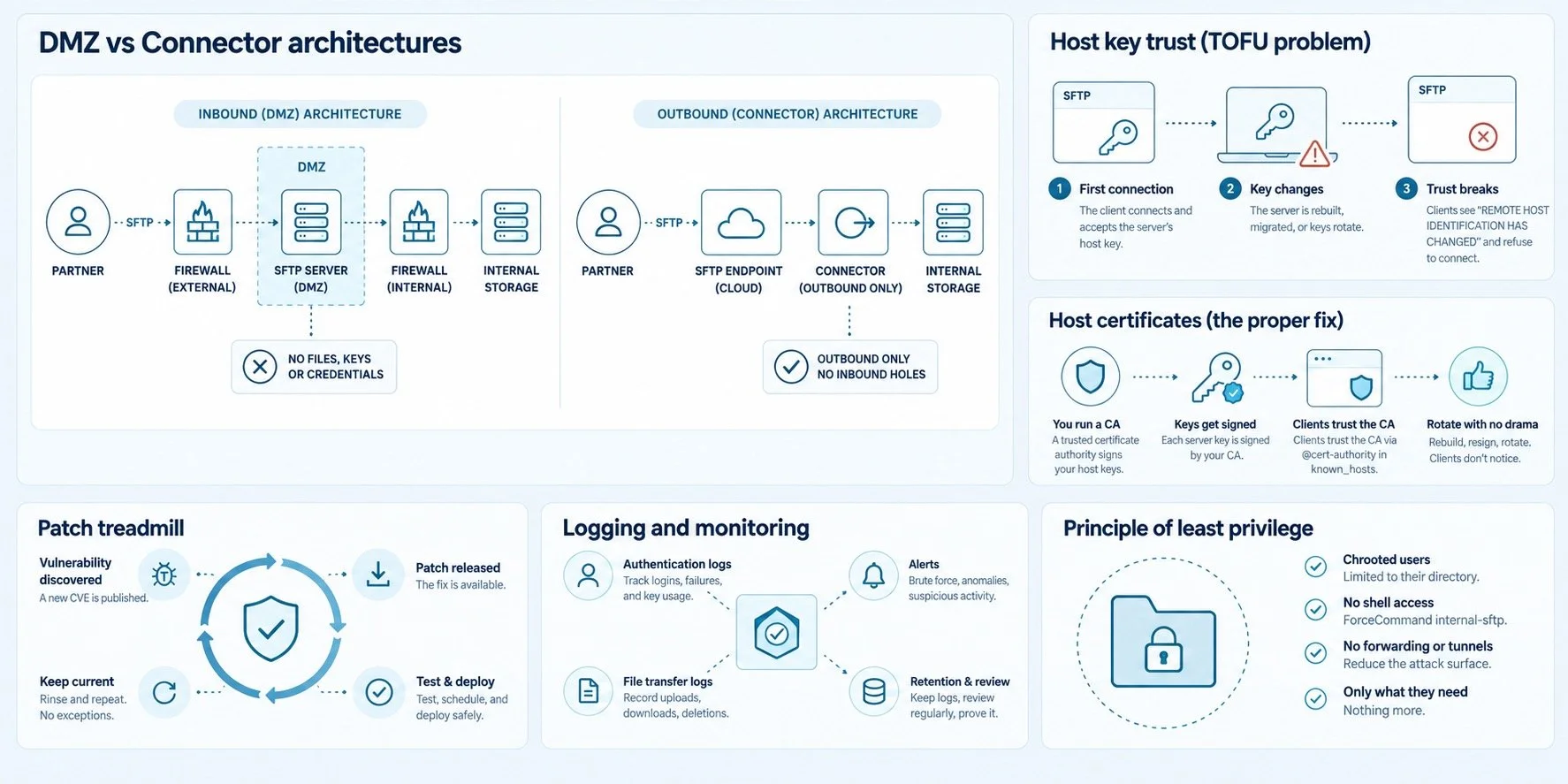
The inbound path on the left is the one that needs two firewalls, a hardened DMZ node, and a rule about what that node is allowed to hold.
Host keys will embarrass you eventually
SSH trust is trust-on-first-use. Your partner's client caches your host key the first time it connects and screams if it ever changes.
So: rebuild the server, restore from a backup image, fail over to the secondary, migrate to a new instance — and every client you have starts throwing REMOTE HOST IDENTIFICATION HAS CHANGED. At three partners that's three phone calls. At four hundred it's a project with a name and a steering committee.
There is a proper fix, and it's worth knowing it exists: OpenSSH supports host certificates, where a CA signs your host key and clients trust the CA via @cert-authority in known_hosts. Rebuild the box, sign a new key, nobody notices. It solves this cleanly.
Almost nobody deploys it, because it means running a CA and getting four hundred partners to trust it, and the partner who still uses WinSCP 5.7 is not going to help you. So most shops fall back to treating host keys as long-lived assets, backed up separately from the machine, and rotated deliberately with an overlap window. Which also works, and which almost nobody does until the first time it bites them.
The patch treadmill is real, and OpenSSH is not exempt
This is the one people underestimate, so let's use one of the most heavily audited codebases in open source as the example rather than a soft target.
| Date | What happened |
|---|---|
| Dec 2023 | Terrapin, CVE-2023-48795, CVSS 5.9. A prefix-truncation attack on the handshake that lets an attacker silently downgrade security features |
| Jul 2024 | regreSSHion, CVE-2024-6387, CVSS 8.1. Unauthenticated remote code execution in sshd, affecting 8.5p1 through 9.7p1. A regression — the bug had been fixed once before and came back |
| Feb 2025 | CVE-2025-26465, a machine-in-the-middle flaw in the ssh client dating to December 2014, though only where VerifyHostKeyDNS is enabled, which is not the default. And CVE-2025-26466, a pre-auth denial of service in sshd affecting 9.5p1 through 9.9p1. Both fixed in 9.9p2 |
| Apr 2025 – Aug 2026 | OpenSSH shipped 10.0 through 10.5, the latest on August 11, 2026 |
None of that is a criticism of OpenSSH. It's the opposite — this is what a well-run, heavily-audited project looks like, and it still means you are on the hook to notice a release, test it, and roll it out before someone else notices it first.
Every one of those entries is a night somebody spent patching a box because a partner needed to send an invoice.
Certificates, if you also speak FTPS or HTTPS
Most partners ask for SFTP. Some will ask for FTPS. One will ask for a browser upload page, because their AP clerk isn't going to install an SFTP client.
The moment you're serving TLS, you're on the certificate renewal treadmill, and that treadmill is speeding up. Ballot SC-081v3 passed the CA/Browser Forum on April 11, 2025 and steps maximum public TLS certificate lifetimes down on a fixed schedule:
March 15, 2026 — 200 days
March 15, 2027 — 100 days
March 15, 2029 — 47 days, with domain validation reuse cut to 10 days
Manual renewal stops being viable somewhere around the second step. Automation isn't optional, it's just a project you haven't scheduled yet.
Your cipher list is now a maintenance item
As of OpenSSH 10.0 (April 9, 2025) the hybrid post-quantum mlkem768x25519-sha256 is the default key agreement algorithm. As of 10.1 (October 6, 2025) the client prints a warning when a connection negotiates a non-post-quantum algorithm, controlled by WarnWeakCrypto and on by default.
Which means partners running modern clients against an older appliance are already seeing warnings about your endpoint. Not in some future migration window. Now.
And then the boring, unglamorous rest of it
Audit trail. Who connected, from where, what they moved, did it complete. internal-sftp will log individual file operations with -l INFO, but they arrive as unstructured syslog lines that nobody has correlated into a transfer record. "We have the logs somewhere" is not an answer during an assessment.
Availability. The partner's overnight batch does not care that you were failing over.
Access reviews. Someone has to be able to say which of those four hundred keys still belongs to a person who still works there.
The pager. All of the above, at 3am, forever.
Worth checking today: if your endpoint's sshd is between 8.5p1 and 9.7p1, it is vulnerable to regreSSHion. If it is between 9.5p1 and 9.9p1, it is vulnerable to CVE-2025-26466. CVE-2025-26465 is a client-side flaw, so that one is your partners' problem rather than yours. ssh -V answers the first two in one line.
The honest scoreboard
| Obligation | Frequency | Goes away if you host it yourself? |
|---|---|---|
| Patch the SSH daemon | Per release, unscheduled | No |
| Rotate and protect host keys | Per rebuild, plus policy | No |
| Renew TLS certificates | 200 days, falling to 47 | No, but automatable |
| Maintain the DMZ and firewall rules | Continuous | No |
| Review keys and accounts | Quarterly, typically | No |
| Keep the endpoint reachable | Continuous | No |
Six rows. None of them were in the original ticket.
So what do you actually do?
Four architectural options, and each one is genuinely right for somebody.
Run it yourself. Correct when you have the staff, the change process, and a small number of partners. Also correct when the data is sensitive enough that you want zero third parties in the path. It is not free, it's just paid for in headcount instead of invoices.
Use your cloud provider's transfer service. If your files already live in S3 or Azure Blob Storage, AWS Transfer Family and Azure's SFTP support put a managed endpoint in front of storage you already own. For a lot of straightforward requirements this is the answer, and adding a third-party vendor on top of it would be silly.
Use a hosted managed service. Somebody else patches the daemon, holds the certificates, and carries the pager. The trade is worth reading the contract over, because in most of these the provider also stores your files. That may be entirely acceptable. It should be a decision rather than a surprise.
Use an outbound-connector service. The newer pattern, and the one worth understanding before you evaluate anything, because it changes the network question rather than the operations question.
How the outbound-connector model works
The first three options share an assumption: either something on your side accepts an inbound connection, or your files move to somebody else's storage. The connector model breaks that assumption, and it's worth understanding whether or not you ever buy one.
You run a small agent next to your own storage, inside your own network. Instead of accepting connections, the agent makes one — a single outbound session to a provider's relay, in the same way your laptop reaches a website. The provider operates the internet-facing endpoint, the certificates, the patching and the availability. Traffic arrives at the relay, travels down the connection the agent already opened, and reaches your storage from the inside.
The operational consequence is the one that matters: there is no inbound firewall rule to write, because there is nothing on your side listening for anyone to connect to. Your network team is asked for an outbound allow rule, which is a conversation that takes minutes instead of weeks.
It doesn't remove trust from the equation. You're still trusting whoever runs the endpoint to run it competently, and you've added a dependency on the connector staying up. What changes is the shape of the exposure: no listening service on your perimeter, and, depending on the implementation, no copy of your files on someone else's disk. Verify both rather than assuming them. Where do the files rest? Who holds the keys? What does the relay retain, and for how long?
Before you file that ticket as a two-hour job: pull up the six rows in the scoreboard above, put a name next to each one, and put a date next to the patching row. If you can fill in all six, run it yourself — genuinely, you'll be fine.
If you can't fill in more than two, you don't have an SFTP problem. You have a staffing problem wearing an SFTP costume, and it's worth deciding that on purpose rather than finding out in eighteen months.
Either way, go and run ssh -V against your current endpoint. OpenSSH is on 10.5 as of August 11, 2026, and if the answer comes back with a 9 in front of it, you've just found the first item for the patching row. That check takes about a minute.