
Hosted SFTP service: where do your files actually live?
Every hosted SFTP service answers one question differently: where do your files live? Three models, and what each one means for your data.
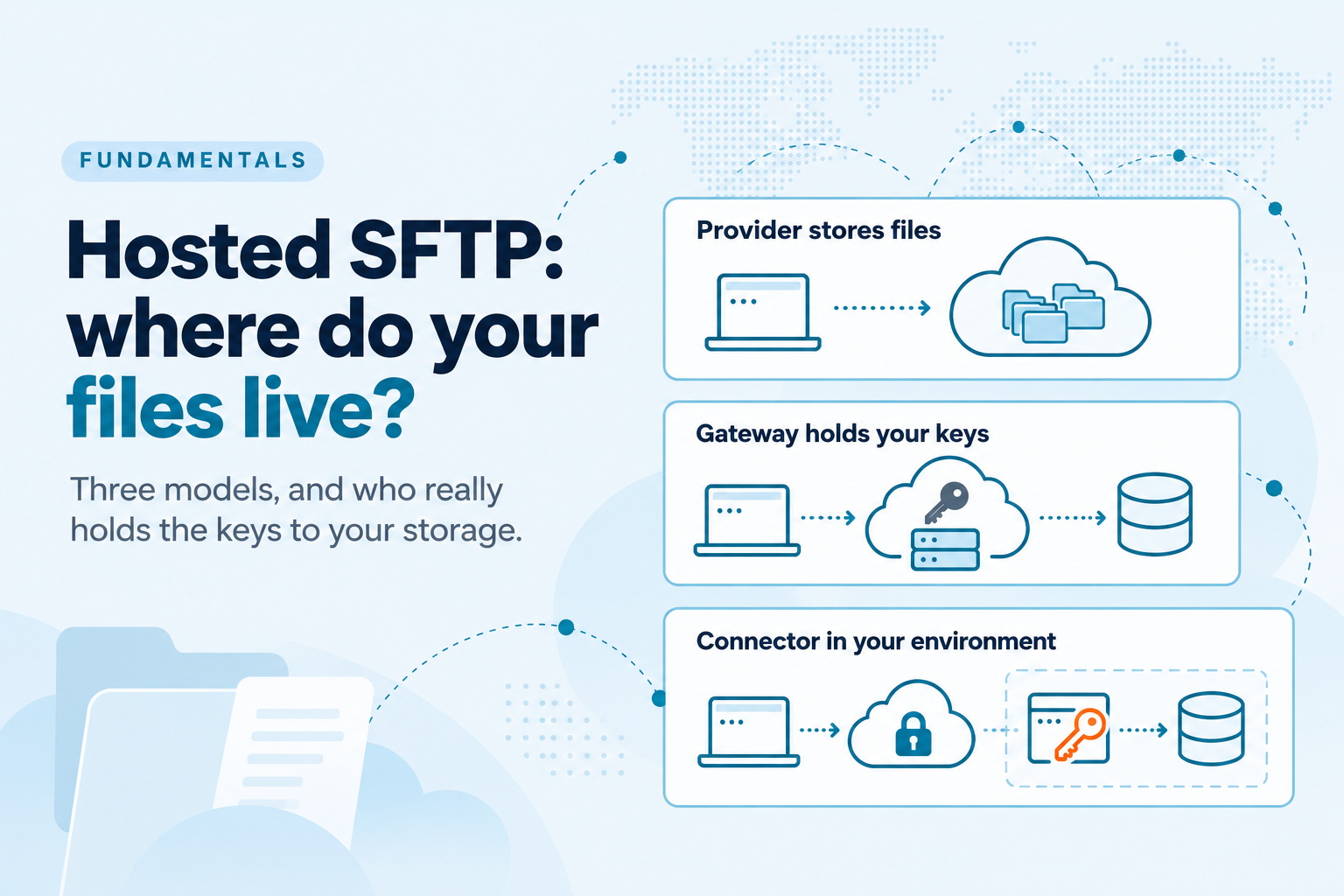
Search for a hosted SFTP service and you will find dozens of providers that look interchangeable. Each one gives you a hostname, user accounts, a web console and a monthly price. Your partners connect, files arrive, and nobody on your team patches a server.
Underneath, they differ on the one question that matters most for regulated data: where do your files actually live, and who holds the keys to them?
The answer is rarely on the pricing page. It shapes your compliance scope, your exposure if the provider is breached, and how hard it is to leave. This article walks through the three models SFTP providers use, and the questions that tell them apart.
Model one: the provider stores your files
This is the classic SFTP hosting model, and what most people picture when they search for an online SFTP server. You sign up, you get storage, and every file your partners upload lands on disks the provider owns or rents from a cloud.
It is the fastest way to start. There is nothing to connect and nothing to configure beyond users and folders.
The trade is custody. Your files sit on infrastructure you do not control, often in a region you did not choose, under the provider's retention and deletion rules. If the provider is breached, your data is part of what is exposed. Moving away later means copying everything out.
When the files are low sensitivity, the volumes are small, and speed matters more than control.
Model two: a gateway in front of your bucket
Many managed SFTP services now let you bring your own storage. You point them at an S3 bucket, an Azure container or a Google Cloud Storage bucket, and uploads land there instead of on the provider's disks.
This is a real improvement: your bucket stays the system of record. But look at how the connection is made. The usual setup asks you to paste an access key and secret into the provider's console, or to add a bucket policy that grants the provider's cloud account access.
Either way, the provider holds standing credentials to your storage. Files usually stream through the provider's servers on the way in, and the provider can reach your bucket whenever its systems decide to. Your data is in your bucket, but the keys to it are in someone else's.
When you want your own bucket as the destination and are comfortable with a vendor holding scoped access to it.
Model three: a connector inside your environment
The third model reverses the direction. A small connector runs in your own environment, next to your storage. It opens an outbound, mutually authenticated connection to the SFTP service, so nothing dials in and your firewall rules stay as they are.
Your storage credentials stay with the connector, on your side. The provider runs the public endpoint, the user management and the audit trail, but it never receives the keys to your bucket and your files are written by a component you run.
The trade is that part of the system is yours to run. You install the connector, it needs to be running for transfers to work, and setup takes longer than pasting a key into a console.
Regulated data, strict data residency, and teams whose security review starts with the question "what can the vendor reach?"
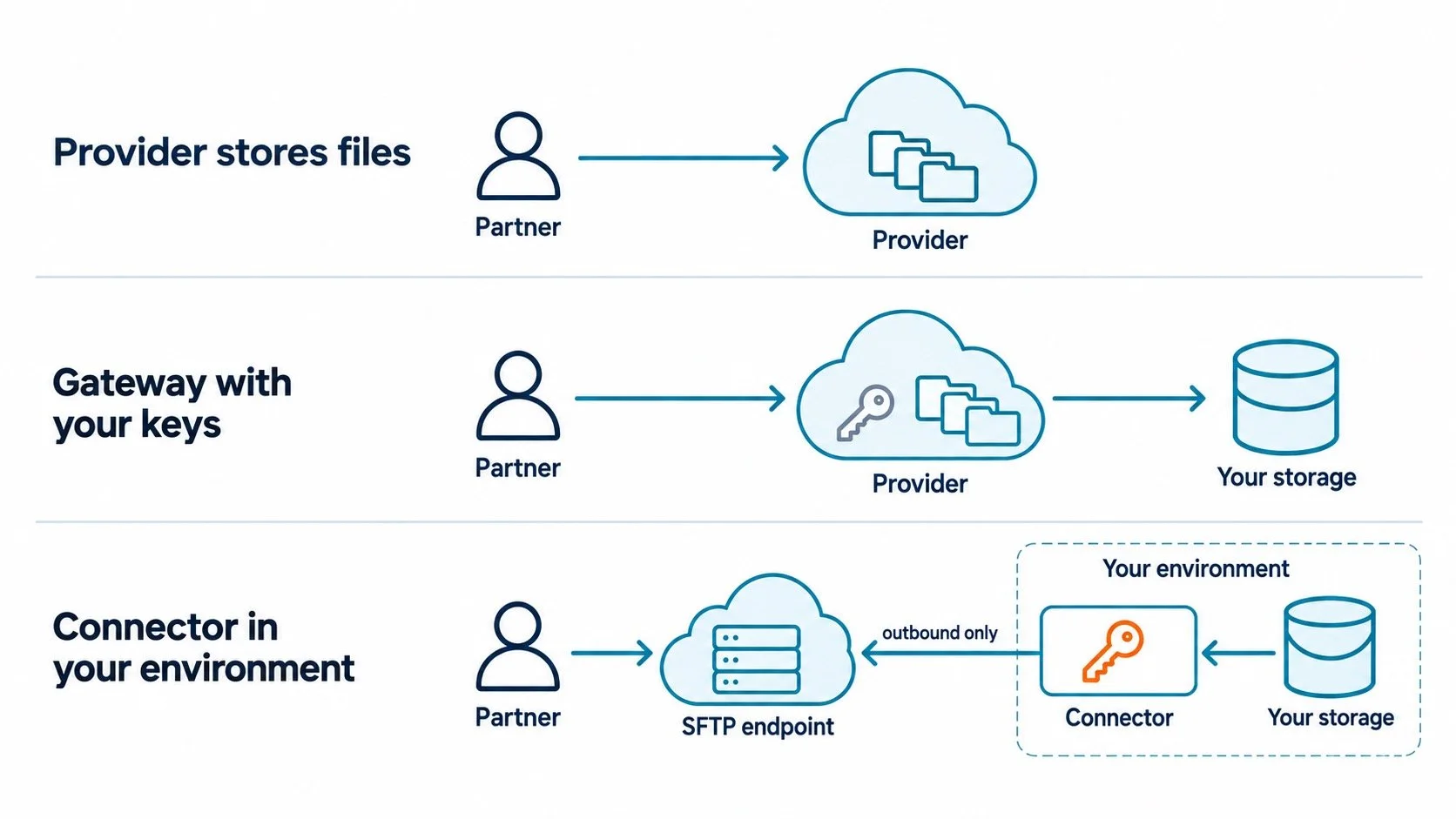
The difference is where the files rest and who holds the key to your storage.
The three models side by side
| Provider stores files | Gateway with your keys | Connector in your environment | |
|---|---|---|---|
| Where files are stored | Provider's storage | Your bucket | Your bucket or file server |
| Who holds storage credentials | Provider | Provider | You |
| Exposure if the provider is breached | Your files | Access to your bucket | The endpoint, not your storage |
| Setup effort | Minutes | Minutes, plus IAM work | Install a connector |
| Leaving the provider | Copy all data out | Revoke the keys | Uninstall the connector |
Five questions to ask any SFTP provider
Marketing pages from SFTP service providers tend to sound alike. These five questions get past them, and the answers usually fit in a sentence.
Where is a file stored at rest after a partner uploads it? If the answer is "our storage", you are in model one, even if they copy it to your bucket afterwards.
Does the file pass through your servers, and is it ever written to disk there? Streaming through memory and staging on disk are different risks.
What credentials to our storage do you hold, and where are they kept? An access key in a vendor database is a standing door into your bucket.
If you were breached tomorrow, what of ours would the attacker reach? A clear provider can answer this precisely. A vague answer is an answer.
What does leaving look like? Revoking a key, uninstalling a component and exporting terabytes are very different exits.
Ask for the answers in writing. Your auditors will ask the same questions later.
Which model is right for you
The right model depends on what you are protecting, not on which provider has the nicest console.
If the files are low sensitivity and you want to start in minutes, a provider that stores them is a reasonable choice. If you want your own bucket as the system of record and can live with a vendor holding scoped access to it, a gateway works well. If any vendor access to your storage is a dealbreaker for your auditors, look for the connector model, and plan to run one small component yourself.
Whichever way you lean, put the five questions above into your evaluation, and price the native cloud options as well. We compared those in SFTP for S3: four ways to do it, and what each one actually costs and Azure Blob Storage has native SFTP. Here is what turning it on costs you. If you are considering running your own server, start with what it actually takes to put an SFTP endpoint on the internet.
A note on where we stand: SFTP.cloud, which publishes this blog, uses the connector model. It does not include storage; it connects to the S3, Azure, Google Cloud or on premises storage you already run.