
Features
Every feature. On your side.
Standard protocols, a browser client, the storage you already own, automatic defense and an audit trail you can verify. The part that touches your files runs on your Storage Connector, inside your network.
That includes automation. SyncJS is a full JavaScript environment with 200+ functions built for your SFTP.cloud environment, and it runs next to your data.
14 days. No credit card. No feature locks.
// Before an upload: refuse Windows executables.
{
  // Path of the file being uploaded
  var path = CtxRelPath();
  if (FileType(path) == "application/vnd.microsoft.portable-executable") {
    Log(path + " is an executable, blocking it");
    // Stop it before a single byte is written
    BlockOperation();
  }
}
01Overview
Seven areas, one platform.
- 02AutomationSyncJS scripts that run before and after every operation, on your Connector.
- 03ProtocolsSFTP, FTPS, FTPES and HTTPS, on standard ports.
- 04WebClientUpload, share and manage files from any browser.
- 05StorageLocal, network, upstream SFTP, S3, Azure Blob and Google Cloud Storage, with every file streamed in parallel.
- 06DefenseAutomatic blocking, geo-fencing and allow-lists.
- 07AuditTwo signed audit chains, and a verifier you run yourself.
- 08Console and APIA web console for configuration, a REST API for automation.
- Try all of itEvery feature is included in the 14-day trial.
Everywhere else, this logic runs on the vendor's servers, which is why those vendors have to be able to read your files. Here it runs on yours, which is why we do not.
02Automation · SyncJS
A policy engine as well as an automation engine.
Your Storage Connector runs SyncJS, a full ECMAScript 5.1 environment with a standard library of 200+ functions built for SFTP.cloud. Your scripts run inside your network, next to your data.
- 01
Fifteen event handlers.
Before and after every operation that matters: uploads, downloads and deletions; folder creation, deletion and listing; renames and moves; listing filters; and tunnel disconnection.
- 02
Before-handlers can refuse.
A script that runs before an upload can inspect it and call
BlockOperation()to stop it. You enforce a rule at the moment of the operation instead of reacting after it has happened. - 03
A real standard library.
HTTP and HTTPS requests. SQL against your own databases. AMQP queues. PGP encryption, decryption and signing. Hashing, HMAC, Base64, CSV and XML. Zip and gzip. Image resampling and metadata. External processes. Slack, Teams, Telegram, Twilio and SMTP. Remote SFTP, FTP, S3, Azure and GCS clients. And more.
- 04
Filtered folder listings.
What a user sees in a directory can be decided by your logic, not by whatever happens to be on disk.
- 05
Secrets stay out of your code.
Scripts read credentials from managed secret storage, so nobody pastes them into the source.
- 06
Written in the editor you already use.
A VS Code extension gives you IntelliSense, and MCP servers are available if you want AI assistance while you write.
Elsewhere, this logic runs on the vendor's servers, so they have to read your files. Here it runs on yours, so we don't.
Read the SyncJS documentation03Protocols
The protocols your partners already use.
- 01
SFTP, FTPS and FTPES.
For the systems and scripts your partners already run, including the ones written a decade ago that nobody wants to touch.
- 02
HTTPS WebClient.
For people who won’t install anything, with secure sharing links for one-off exchanges.
- 03
Standard clients, standard ports.
Nothing proprietary for your partners to install, and post-quantum cipher suites on every protocol.
04The WebClient
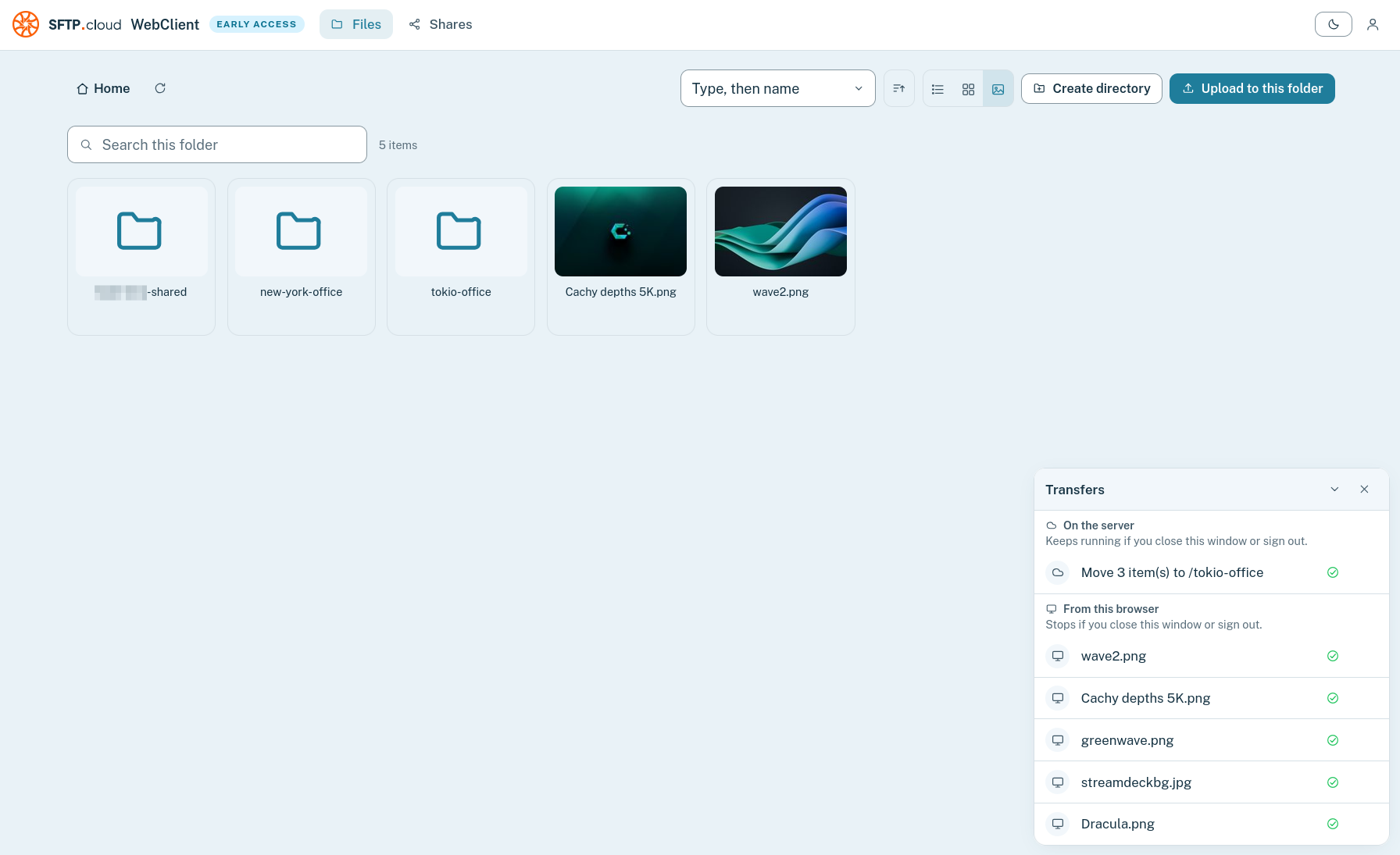
Every file, from any browser. Nothing to install.
Upload, move, rename and share from a clean web interface that runs anywhere.
Switch between list, grid and preview views, watch transfers in real time, and hand long operations to the server so they keep running after you close the tab.
05Storage
The storage you already own.
Connect several backends at once, across different clouds and networks, with a Connector in each.
Your files stay in the account, region and jurisdiction you already chose.
Optionally encrypted, with a key we never have.
Every backend can hold your files as they are, or encrypted with a key that lives on your Storage Connector. Anyone who reaches your storage another way finds only ciphertext.
Every file moves in parallel.
Each storage location on your Connector keeps several outbound connections open to your Head. Every upload and every download is split into chunks that travel over them at the same time, which a conventional SFTP server, sending each file down a single stream, can’t do.
- Local and network storageSMB/CIFS and NFS shares, DFS, NAS and SAN
- Upstream SFTP serversKeep an existing server and put SFTP.cloud in front of it
- Amazon S3And S3-compatible storage, including MinIO
- Azure Blob Storage
- Google Cloud Storage
06Defense
Defense that acts before an administrator can.
- 01
Automatic blocking of attacking addresses.
Repeated failed sign-ins from an address get it banned automatically, with no administrator involved. Abuse attempts and protocol errors are identified deterministically, with no guesswork, and trigger the same ban.
- 02
Geo-fencing.
Restrict each account to the countries it should ever be used from.
- 03
Connection allow-lists and safe-lists.
Written by you, on Dedicated environments.
- 04
Post-quantum cipher suites.
On every protocol, with mutual TLS (mTLS) between every internal component.
07Audit
An audit trail you can verify.
- 01
Two signed audit chains for every session.
One written by us and one by your Connector, each hash-chained line by line and signed with a different key.
- 02
Every session, file and administrative change.
Recorded on both sides. Yours is signed with a key that never leaves your Connector.
- 03
A verification tool you run yourself.
Download it, point it at your logs and check them on your own machine. No account, no upload, and no involvement from us.
08Console and API
A console for everything. An API for everything else.
- Web consoleConfigure everything from your browser.
- REST APIAutomate whatever you would rather not click through.
- ScriptableAccounts, permissions, Connectors, policies and automation.
Fourteen days on a shared environment, with your own storage connected. No credit card, and nothing to cancel if you decide it is not for you.
Every feature, from day one.
Fourteen days on a shared environment with your own storage connected. No feature locks, no credit card, and nothing to cancel if it is not for you.
Comparing plans? See pricing or talk to an engineer. The person who answers builds the product.