
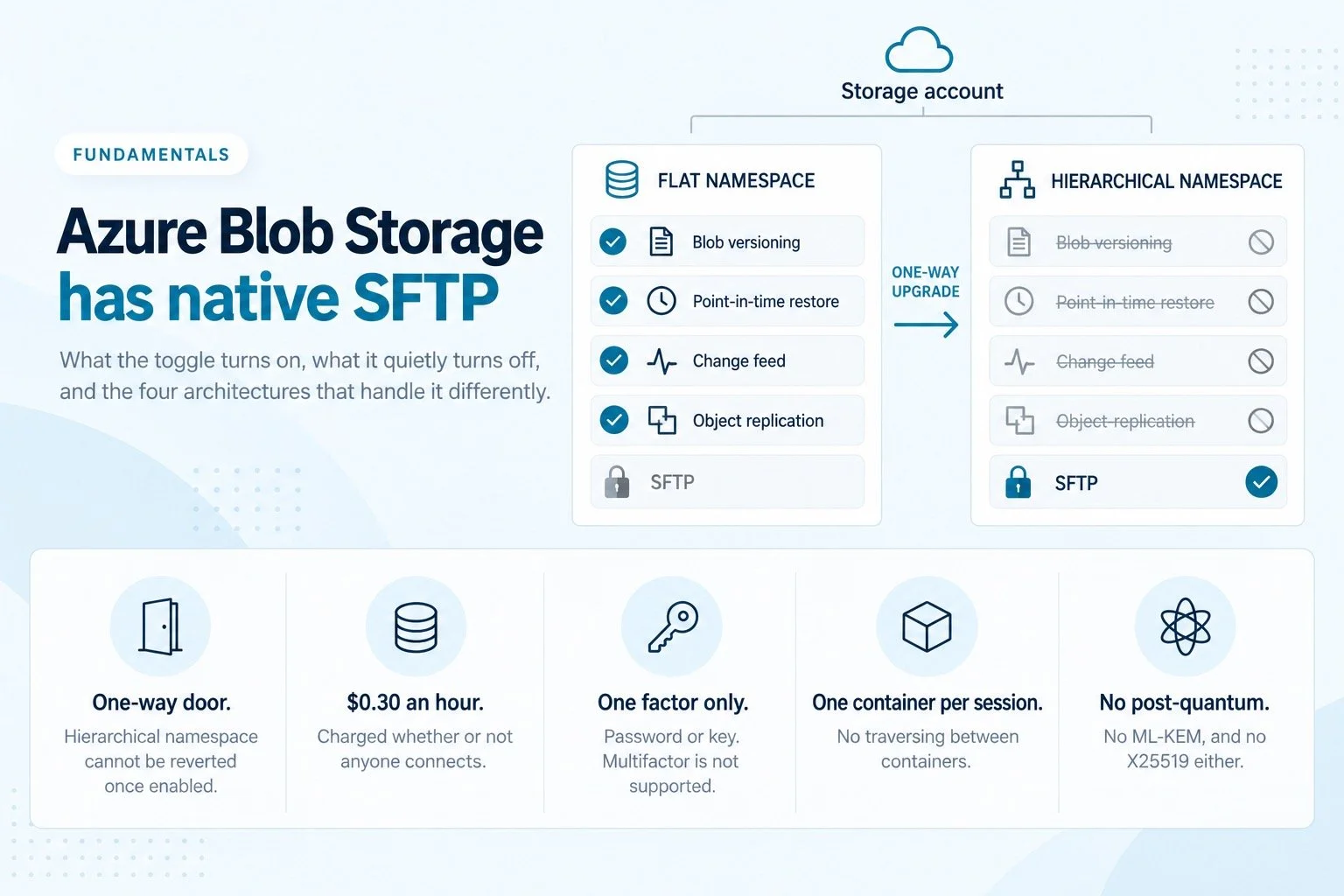
The checkbox is real and it works. Setting up SFTP on Azure also requires a one-way change to your storage account, costs $0.30 an hour whether anyone connects or not, and quietly removes blob versioning and point-in-time restore.
Your data is in Azure Blob Storage. A partner needs to send you files over SFTP. You open the storage account, find the SFTP setting, and there it is: native support, first party, one toggle.
That toggle is real and it works. Plenty of organizations run SFTP on Azure happily. But it is not a toggle that only turns on SFTP, and the things it turns off are not listed next to it.
This is what it actually commits you to.
First, the prerequisite: hierarchical namespace
SFTP support on Azure Blob Storage requires hierarchical namespace to be enabled on the storage account. That is not a detail. Hierarchical namespace is what turns a flat key space into real directories, which is the only way SFTP semantics can work at all, and it is the same capability that makes an account a Data Lake Storage Gen2 account. If your account already has it, skip ahead. If it does not, three things matter.
The upgrade is permanent. Microsoft's own wording: "An upgrade is one-way. There's no way to revert your account once you've performed the upgrade." You are not enabling a feature, you are converting the account.
Writes stop during the migration, and reads are discouraged because they can destabilize the process. So this is a maintenance window, not a checkbox, and the size of that window depends on your account.
Several features have to be switched off before the upgrade will validate, including blob snapshots, encryption scopes, immutable storage, blob soft delete and container soft delete. The account also cannot contain page blobs, and archived blobs need renaming beforehand or they lose the ability to rehydrate.
Most of those can be turned back on afterwards. Some cannot.
az storage account show \
  --name <your-account> \
  --resource-group <your-group> \
  --query "isHnsEnabled"
Returns true if hierarchical namespace is already on, in which case this decision is much cheaper than it looks.
What hierarchical namespace costs you permanently
This is the part that gets discovered late, usually by whoever owns data protection rather than whoever wanted the SFTP endpoint.
| Feature | Available with hierarchical namespace |
|---|---|
| Blob versioning | Not available |
| Point-in-time restore | Not available |
| Change feed | Not available |
| Object replication | Not available |
| Container soft delete | Available |
| Immutable storage, container level | Available |
| Lifecycle management | Available |
| Encryption scopes | Available |
| Blob snapshots | Preview |
Blob versioning and point-in-time restore are worth pausing on, because together they are most of what stands between you and a bad afternoon. Versioning is what lets you recover a blob that was overwritten with garbage. Point-in-time restore is what lets you roll a container back to before a script went wrong or an account was compromised. Neither is available on the account configuration that Azure SFTP requires.
Blob soft delete is the one to confirm for yourself, because Microsoft's feature support matrix lists it as supported while the data protection overview has described it as unavailable for Data Lake Storage workloads. That matrix moves, so check the current table against your own requirements rather than trusting any blog post, including this one.
"Add SFTP" and "give up blob versioning" look like unrelated decisions. They are the same decision.
The price: you pay for the endpoint to exist
Enabling SFTP costs roughly $0.30 per hour in most US regions, billed for every hour the setting is on. Check your own region, because it varies.
That works out to about $216 a month, or $2,628 a year, and it is charged whether or not a single client connects. One partner dropping three files a week costs exactly what a partner moving terabytes costs.
Transactions, storage and networking on the underlying account are extra. Every SFTP operation converts into a read, write or other transaction and is billed as one.
Microsoft's own support answers suggest enabling SFTP only when you need it and disabling it afterwards, which tells you something about how the pricing is meant to be managed. It also tells you it is not a model designed for an endpoint that partners connect to unpredictably, which is the normal case.
If that number looks familiar, it is almost identical to what AWS charges for a single Transfer Family protocol endpoint. The two hyperscalers landed on the same shape: pay for availability, not usage.
What the endpoint can and cannot do
Native does not mean complete. These are the limits that show up in production rather than in a proof of concept.
- No random writes. Any operation opening a file with both read and write flags fails. Applications that seek into a file and modify part of it will not work.
- No symbolic or hard links. Creating them is blocked and reading them is unsupported.
- Rename onto an existing name fails. The familiar pattern of uploading to a temporary name and renaming over the previous version does not behave the way it does on a filesystem. Anything that treats rename as an atomic publish step needs rewriting.
- One container per connection. Traversing between containers, or operating on more than one container in a single session, is unsupported. If a partner needs to read from one container and write to another, that is two connections.
- A 500 GB ceiling on any single file uploaded through the SFTP endpoint.
- A two minute idle timeout. Interactive sessions and slow trickle transfers get dropped, and some clients handle that less gracefully than others.
- No free space reporting. Clients that run
dfbefore uploading will not get an answer. - No content hash by default.
Content-MD5is null on blobs written through SFTP. If your downstream integrity checks read that property, they will find nothing there. - No undelete through SFTP. A soft deleted blob has to be restored through the REST API.
- Several extensions are unsupported, including
fsync@openssh.com,limits@openssh.com,lsetstat@openssh.comandstatvfs@openssh.com. SFTP is the only subsystem available, so anything expecting a shell after authentication fails. - Some clients simply do not work, including Kemp, paramiko 1.16.0, and older builds of SSH.NET. Worth checking against whatever your partners actually run, because you do not get to choose their client.
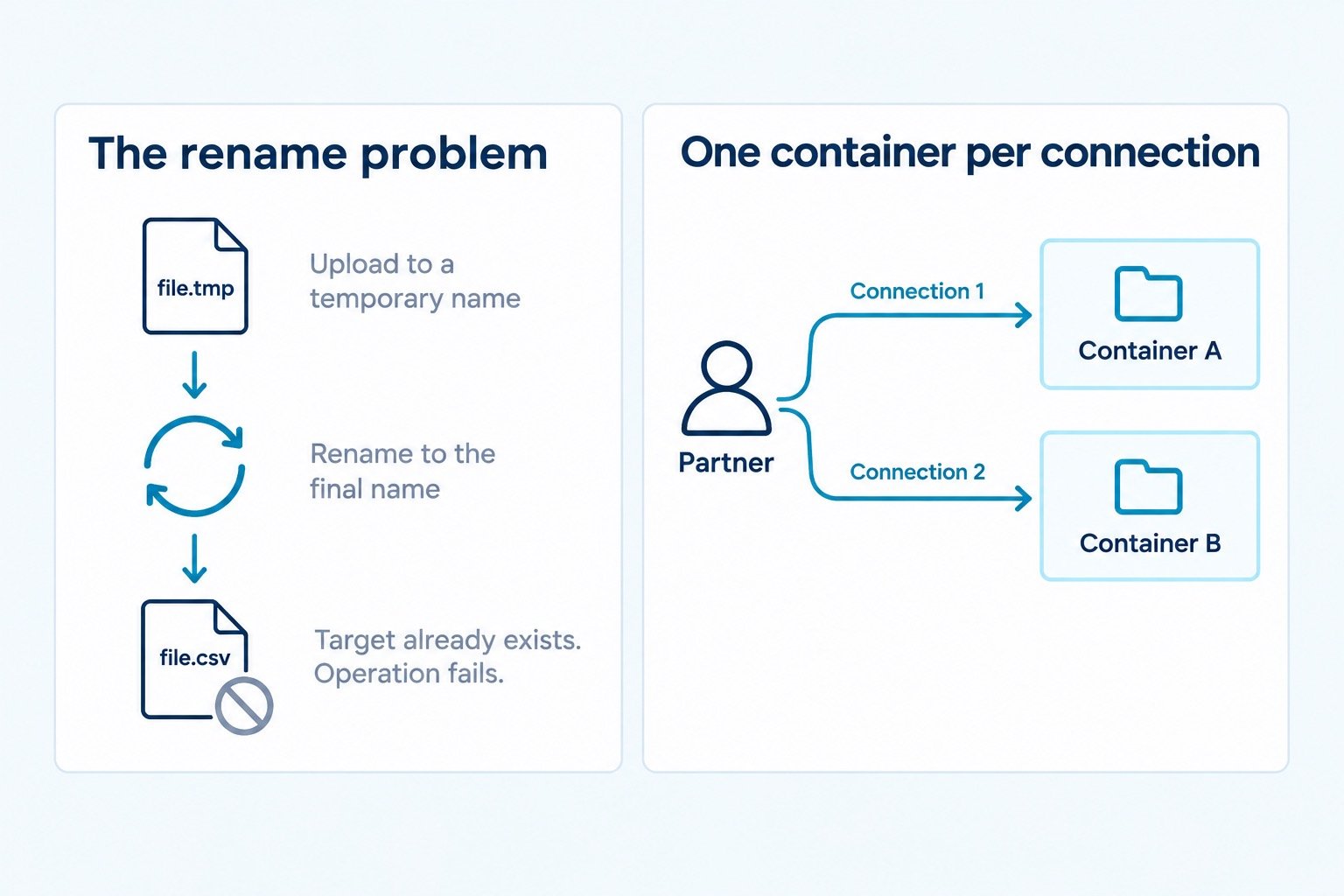
Left, the upload-then-rename publish pattern fails. Right, one session reaches one container.
Identity is a second directory to run
Authentication is primarily through local users, which exist only inside the storage account. You can have up to 50,000 of them, each with up to 10 public keys, and passwords are generated by Azure rather than chosen.
Microsoft Entra ID can also be used to authorize SFTP transfers, which helps if your users are already there. Your external partners usually are not.
One line in the documentation deserves attention: multifactor authentication, meaning a valid password and a valid key pair together, is not supported. You get one factor. For an endpoint exposed to the internet and carrying whatever your partners send, that is a constraint worth writing into the risk register rather than discovering during an audit.
The cryptography is behind
Azure SFTP negotiates key exchange from this set:
ecdh-sha2-nistp384
ecdh-sha2-nistp256
diffie-hellman-group14-sha256
diffie-hellman-group16-sha512
diffie-hellman-group-exchange-sha256
There is no post-quantum key exchange in that list. There is no X25519 either. Host keys are RSA and NIST P-curve ECDSA, with no Ed25519 option, and ssh-rsa is still accepted for client public keys despite OpenSSH having disabled it by default years ago.
Whether that matters depends on your threat model and your retention obligations. Traffic captured today and decrypted later is a real concern for anything with a long confidentiality life, which covers most of what moves over SFTP: payroll, claims, patient data, financials. We wrote up the reasoning and where each vendor stands in why we run post-quantum key exchange on every protocol.
Networking has one sharp edge
Storage accounts do not support static IP addresses. If a partner's security team requires a fixed address to allowlist, which is a very common request in finance and healthcare, native Azure SFTP cannot give them one. You can restrict inbound access with firewall rules, virtual networks and private endpoints, but those settings apply at the application layer to every Azure Storage endpoint on the account, not just SFTP.
Also worth knowing: port 22 stays open on the endpoint even when the account setting is disabled.
So what are the alternatives
Four architectures for cloud SFTP, same as anywhere else. The Azure specifics change which one fits.
Native SFTP on Blob Storage. Simplest by a wide margin when it fits. It fits when your account is already hierarchical namespace, you do not depend on blob versioning or point-in-time restore, each partner needs one container, your volumes make $216 a month reasonable, and nobody is asking for FTPS or a static IP.
Run your own SFTP server on Azure. A Linux VM with sshd and the blob storage mounted, usually through BlobFuse2 or NFS 3.0. You get full control, full protocol support and no per-hour endpoint fee. You also get everything in what it actually takes to put an SFTP endpoint on the internet: patching, host key custody, the DMZ conversation, certificate renewal, quarterly access reviews and somebody carrying the pager. That trade is sometimes correct. It is never free.
A hosted SFTP service, sometimes sold as SFTP as a service. Somebody else runs the endpoint and the features around it. In most managed SFTP services your files land on the provider's storage first, sometimes permanently. That may be fine. It should be a decision, not a discovery. Ask where files rest, for how long, who holds the keys, which sub-processors touch them, and what happens if the provider is breached or you leave.
The outbound connector model. A small agent runs in your own Azure environment, authenticates to your storage with an identity you create and scope, and opens a single outbound connection to a provider that operates the internet-facing endpoint. No inbound rule, because nothing on your side is listening. No credentials handed over, because the agent holds them and never sends them anywhere. Your storage account stays as it is, which means you are not trading blob versioning for SFTP, and the endpoint's protocol support is no longer limited by what Blob Storage implements.
It does not remove trust. You are still relying on whoever runs the endpoint, and you have added a component that has to stay up. What changes is the shape of the exposure, and that is something to verify rather than take on faith. Ours is documented on our security page.
The honest scoreboard
| Native Azure SFTP | Self-hosted VM | Hosted MFT | Outbound connector | |
|---|---|---|---|---|
| Endpoint cost | ~$216/mo | VM + storage | Subscription | Subscription |
| Requires hierarchical namespace | Yes | No | No | No |
| Costs you blob versioning | Yes | No | No | No |
| FTPS or FTPES available | No | Yes, you build it | Usually | Usually |
| Multifactor authentication | No | Yes | Usually | Usually |
| Post-quantum key exchange | No | If you configure it | Varies | Varies |
| Static IP for partner allowlists | No | Yes | Usually | Usually |
| You patch the daemon | No | Yes | No | No |
| Inbound firewall rule | Azure-hosted | Yes | Usually | No |
| Provider holds your files | No | No | Usually | Varies, verify |
| Provider holds storage credentials | No | No | Usually | Varies, verify |
Swipe to see all four columns.
Eleven rows. Only one of them is about money.
Four questions before you toggle anything
Is the account already hierarchical namespace? If yes, this decision is much cheaper than it looks. If no, you are scheduling a one-way migration with a write outage, and that belongs in a change window with a rollback plan that does not exist.
Do you rely on blob versioning or point-in-time restore? Ask whoever owns backup and recovery, not whoever wants the SFTP endpoint. If the answer is yes, native Azure SFTP is off the table and the conversation is over quickly.
Will anyone ask for FTPS, a static IP, or two factors? Partners in regulated industries ask for all three regularly. Native Azure SFTP answers no to each. Finding that out after you have migrated the account is an expensive way to learn it.
How steady is the volume? $216 a month to move a few files a week is a poor ratio. At serious volume the fixed cost disappears and the per-transaction charges become the thing to model. Flat subscription pricing behaves differently again, which is worth running against your own numbers rather than an example in a vendor's deck. Ours is published.
Worth checking today: run the isHnsEnabled query from earlier against the account you had in mind. If it returns true, you already made this trade and the only question left is the $216. If it returns false, the whole decision is still in front of you.
SFTP.cloud puts a managed SFTP, FTPS, FTPES and HTTPS endpoint in front of the storage you already own, using an outbound Storage Connector you deploy in your own environment. Your files are never written to our disks, and we never hold your storage credentials. See how it works, or read the Azure Blob Storage integration detail.