
SFTP for S3: four ways to do it, and what each one actually costs
S3 is object storage. SFTP expects a filesystem. What that mismatch costs you, the real AWS Transfer Family pricing, and four architectures that bridge it.
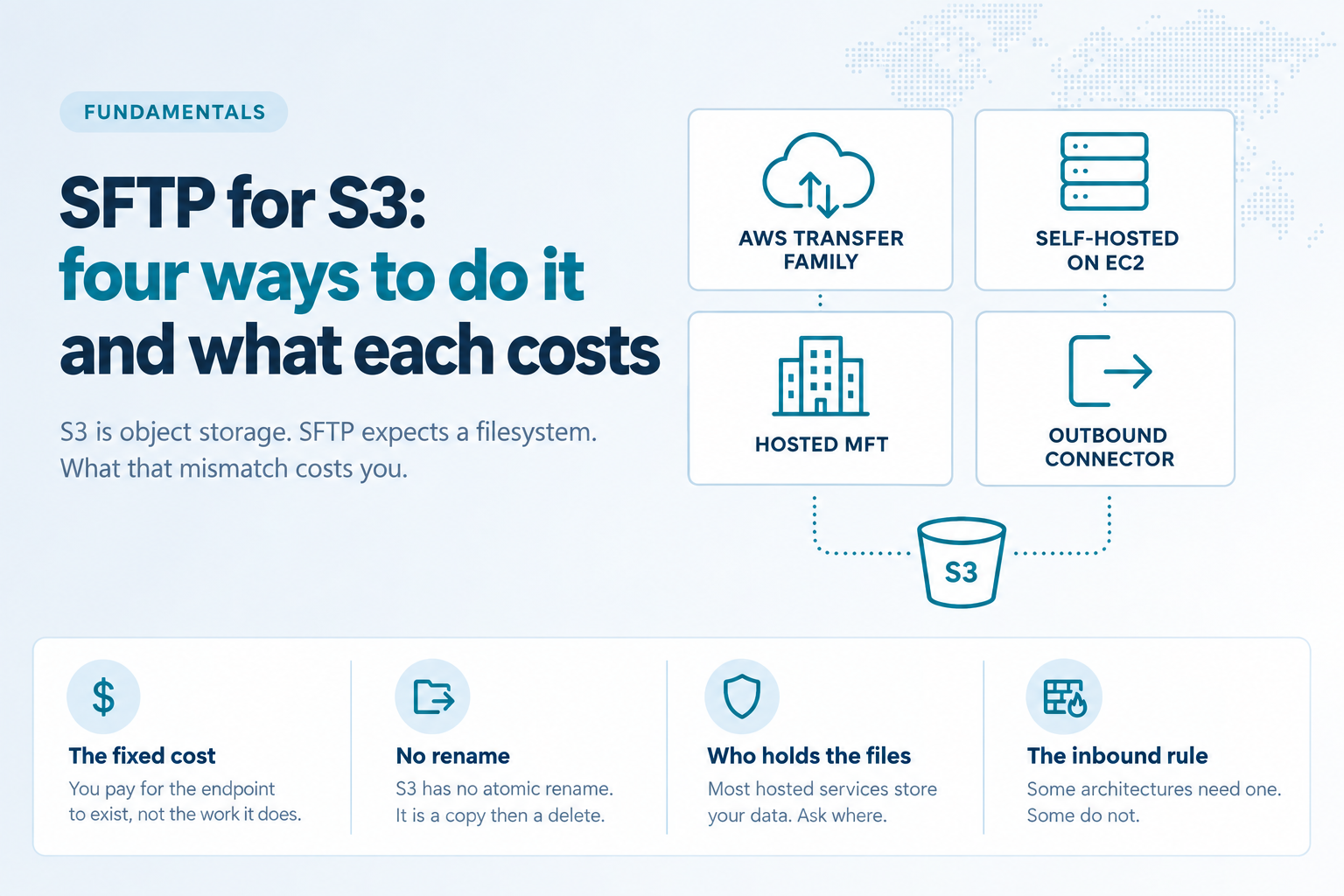
A partner needs to send you files. They've asked for SFTP, because SFTP is what everybody asks for. Someone forwards you the request and it reads like a small job.
Install a server. Create a user. Hand over a key. Done by lunch.
And honestly? For a box on your internal network, that is roughly the job. We're not going to pretend otherwise. sshd with internal-sftp and a chroot is a genuinely good piece of software, it's free, and for an internal transfer between two machines you control it is the correct answer. Anyone telling you that you need a commercial platform to move a file between two servers in the same rack is selling you something.
The trouble starts at the word internet.
S3 is not a filesystem, and SFTP assumes one
SFTP was designed against a POSIX filesystem. It expects directories that exist, files you can seek into and write part of, and a rename operation that either happens completely or does not happen at all.
S3 offers none of those.
There are no directories
What looks like /invoices/2026/march/ is a flat key namespace with slashes in the names. Listing a "directory" is a paginated API call across a prefix, and on a bucket with a million objects under one prefix it is slow enough that clients time out.
There is no rename
This is the one that bites hardest. A great many SFTP clients, and nearly every automated transfer script written in the last twenty years, upload to a temporary name and then rename the finished file into place. It is the standard way to signal "this file is complete, you may now process it." In S3 there is no rename primitive. A rename is a server-side copy followed by a delete. For a 40 GB file that is not an atomic marker, it is a multi-minute operation with a window where the file exists twice, or briefly not at all.
There is no append, and no partial write
Objects are immutable. You replace the whole thing. A client that opens a file, seeks to the end and appends a line is doing something S3 has no equivalent for.
Every solution below is a way of papering over these three gaps. They differ in who does the papering, and what it costs you.
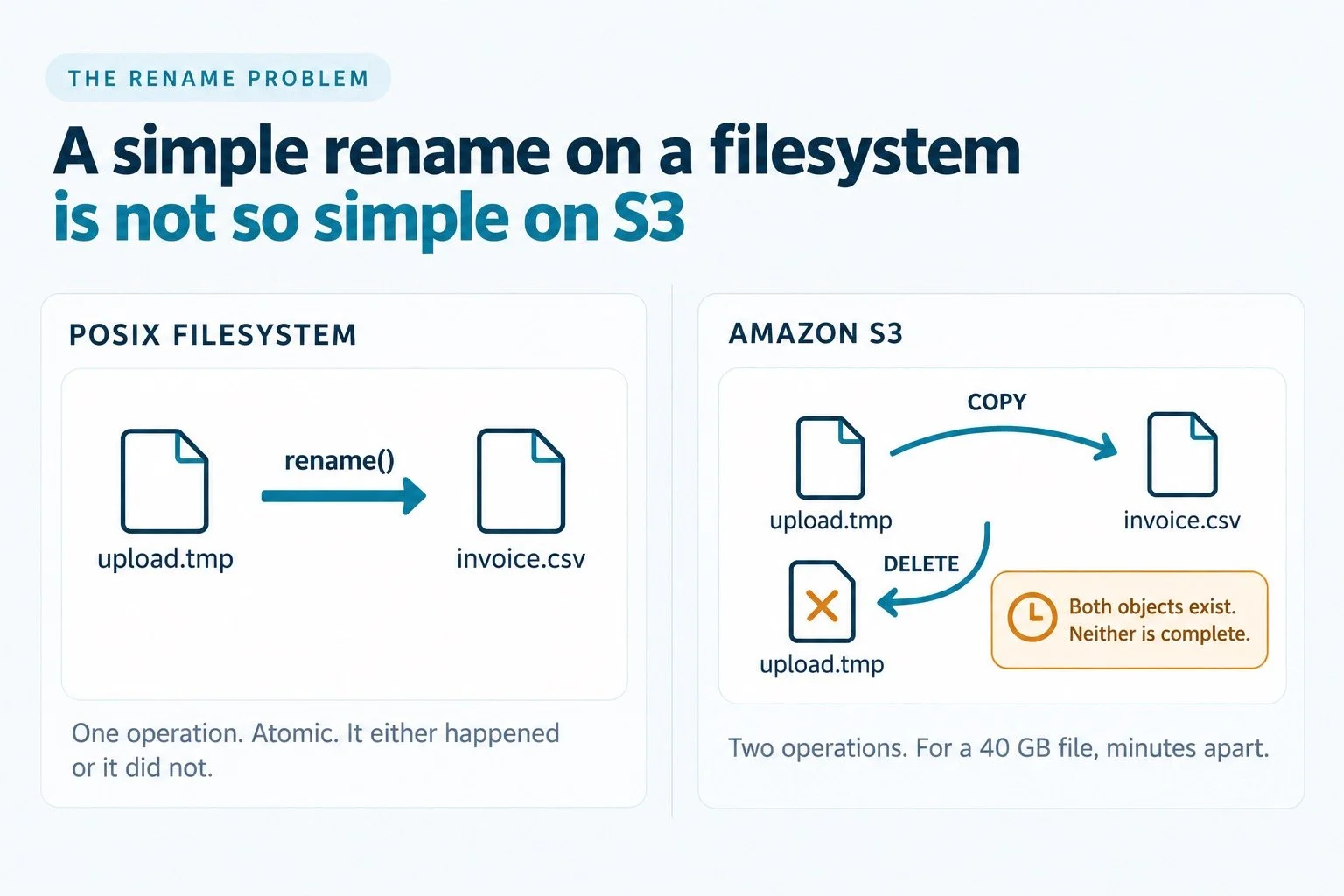
Three gaps, and the one that bites hardest: in S3 a rename is a copy followed by a delete.
Option one: AWS Transfer Family
The first-party answer. AWS operates the SFTP endpoint, authenticates your users, and writes into your bucket. There is nothing to patch and nothing to run.
It works, and for a lot of requirements it is the correct choice. The thing to understand is the pricing model, because it charges for availability rather than usage.
You pay $0.30 per hour, per protocol, per server endpoint, for every hour the endpoint exists, whether or not anybody connects. That is roughly $216 a month, or $2,628 a year, for SFTP alone. Enable FTPS as well and it doubles. A VPC endpoint rather than a public one is $0.40 an hour.
On top of that, $0.04 per gigabyte uploaded and downloaded. Note that AWS generally does not charge for ingress; Transfer Family does.
Then the parts that are easy to miss when you budget:
$0.40 per secret per month in Secrets Manager for every user authenticating with a password. A hundred partners with password auth is $40 a month before anyone transfers anything.
$0.50 per hour for a Transfer Family Web App, if you want a browser upload page. That is another $360 a month, and it is a separate login from your SFTP users.
Custom authentication means writing and maintaining Lambda functions.
A usable audit trail means wiring up CloudWatch yourself. It is not presented for you.
A stable branded hostname means Route 53 setup.
For a low-volume workload the ratio is poor. One partner dropping a few files a day costs the same $216 a month as one moving terabytes, because you are paying for the endpoint to exist.
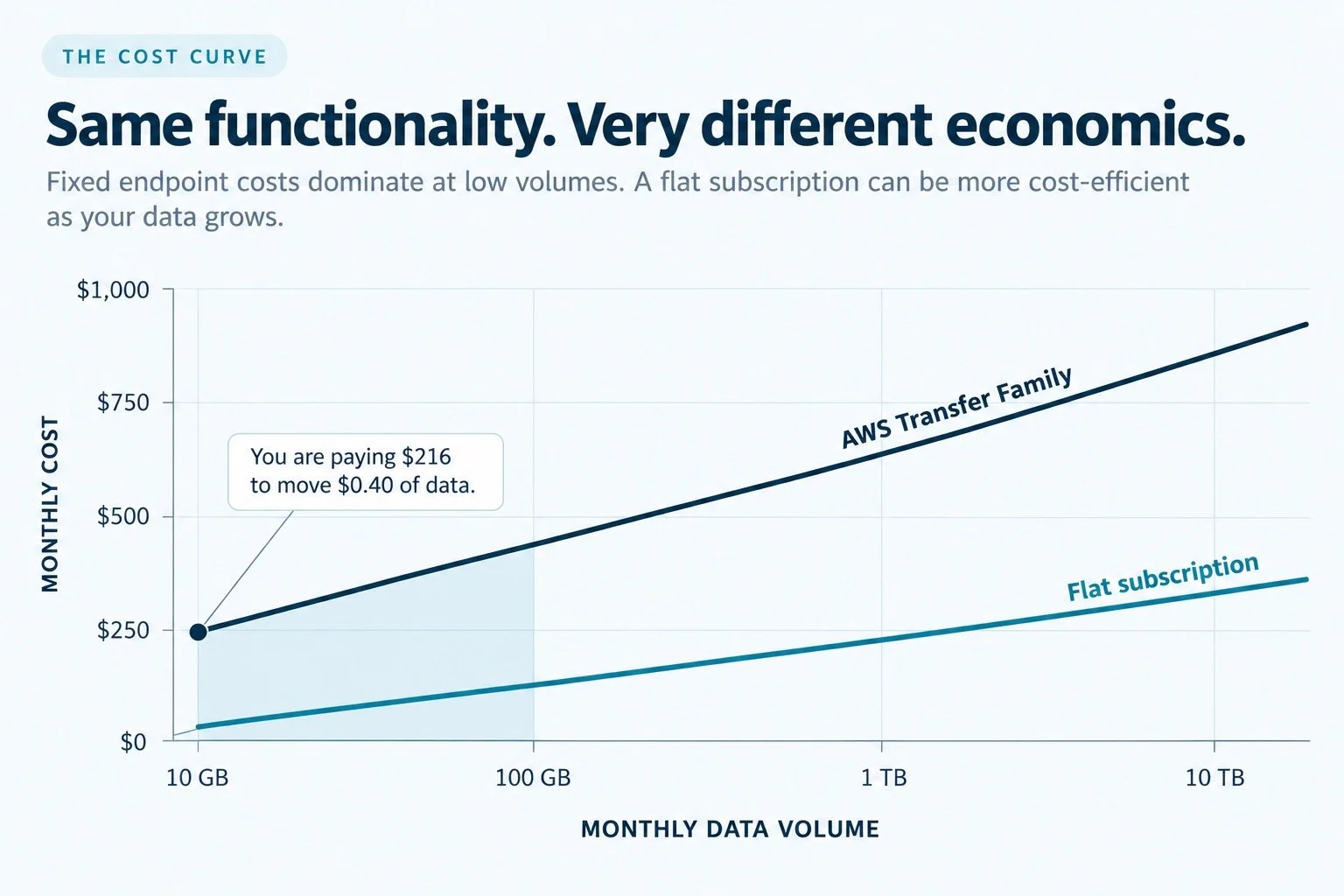
Transfer Family charges for the endpoint's existence. At low volumes, almost all of the bill is availability rather than work.
When Transfer Family is the right answer
Transfer Family fits when you are already deep in AWS, you want first-party support, your volume is high enough that the fixed cost stops mattering, and you have the engineering time for the Lambda and CloudWatch work.
If the arithmetic above is what sent you looking for an AWS Transfer Family alternative, the three options that follow are the realistic ones.
Option two: run your own on EC20
The classic alternative, and it got substantially better this year.
Historically this meant an EC2 instance running sshd, with S3 presented as a filesystem through a FUSE layer such as s3fs-fuse or rclone mount. It worked, more or less, and it inherited every one of the semantic gaps above, plus FUSE performance characteristics that surprised people under load.
On April 7, 2026, AWS made S3 Files generally available, and it changes this option considerably. S3 Files is built on EFS and presents an S3 bucket as an NFS v4.2 filesystem, mountable from EC2, Lambda, EKS and ECS. Files written through the filesystem appear as S3 objects, and objects written to the bucket appear in the filesystem. Full file semantics, no FUSE.
That makes "run sshd on a small instance with the bucket mounted" a genuinely reasonable architecture for the first time, and dramatically cheaper than Transfer Family at the endpoint level.
Three things to know before you build on it:
Synchronization is not instant. Changes are aggregated and committed back to S3 roughly every 60 seconds as a single PUT. If your downstream pipeline triggers on S3 event notifications, that lag is now in your critical path.
Conflicts have a defined loser. If a file is modified through the filesystem and in the bucket at the same time, S3 is the source of truth and the filesystem version is moved to lost+found, with a CloudWatch metric marking the event.
The cache evicts. File data not accessed for 30 days is removed from the filesystem layer, though not from S3, so your storage costs track your active working set rather than your whole bucket.
And of course you now own everything in what it actually takes to put an SFTP endpoint on the internet: patching sshd, protecting host keys, the DMZ, the certificate treadmill, access reviews, and the pager.
When self-hosting is the right answer
When you have the staff and the change process, your volumes are modest, and the cost difference is worth the operational load. It genuinely can be worth it, and anyone telling you otherwise is selling something.
The same reasoning applies to S3-compatible stores such as MinIO, Backblaze B2 and Wasabi, with the difference that there is no first-party managed option to compare against.
Option three: a hosted managed file transfer service
Somebody else runs the endpoint, patches the daemon, holds the certificates and carries the pager. You get a web console, user management, audit logging and usually a workflow engine, without building any of it.
The trade is worth reading the contract for. In most of these services your files land on the provider's storage. Sometimes they are copied on to your bucket afterwards, sometimes they stay. Either way there is a period, often an indefinite one, where your files sit on infrastructure you do not control.
That may be entirely acceptable. Plenty of well-run companies make that trade deliberately and are right to. What it should not be is a surprise discovered during a security review eighteen months in.
The questions to ask, and to get answered in writing:
Where do the files rest, and for how long?
Who holds the encryption keys?
What does the provider retain after a transfer completes?
Which sub-processors touch the data, and in what jurisdictions?
What happens to the files if the provider is breached, or if you leave?
When a hosted service is the right answer
When you want the operational burden gone, you need the surrounding features, and the data custody question has a satisfactory answer for your compliance posture.
Option four: the outbound-connector model
The newer pattern, and the one worth understanding even if you never buy one, because it answers a different question than the other three.
Options one through three share an assumption: either something accepts an inbound connection, or your files move to someone else's storage. The connector model breaks that assumption.
You run a small agent next to your bucket, in your own AWS account. It authenticates to S3 with an IAM identity you create and scope, and that identity never leaves your account. Instead of accepting connections, the agent makes one, opening a single outbound session to the provider's relay. The provider operates the internet-facing endpoint, the protocols, the certificates and the availability. Traffic arrives at the relay, travels down the connection the agent already opened, and reaches your bucket from the inside.
Two consequences follow.
There is no inbound rule
Your security group stays closed. Nothing on your side is listening, so there is nothing on your perimeter for anyone to find. Your network team is asked for an outbound allow rule, which is a fifteen-minute conversation rather than a six-week one.
There is no cross-account trust to review
No access key, no secret key, no assumed role in the provider's account, no cross-account trust policy. Rotate your IAM credentials whenever you like; the provider does not need telling, because it never had them.
It does not remove trust from the equation. You are still trusting whoever runs the endpoint to run it competently, and you have added a dependency on the connector staying up. What changes is the shape of the exposure. Verify rather than assume: ask where files rest, who holds the keys, and what the relay retains. Ours are set out on our security page, including the audit trail design and what we can and cannot produce under legal process.
The honest scoreboard
| Transfer Family | Self-hosted on EC2 | Hosted MFT | Outbound connector | |
|---|---|---|---|---|
| Endpoint cost | ~$216/mo per protocol | Instance plus S3 Files | Subscription | Subscription |
| Per-GB charge | $0.04 in and out | S3 request costs | Usually | Varies |
| You patch the daemon | No | Yes | No | No |
| Inbound firewall rule | N/A, AWS-hosted | Yes | Usually | No |
| Provider holds your files | No | No | Usually | Varies, verify |
| Provider holds S3 credentials | N/A, IAM role | N/A | Usually | Varies, verify |
| Second protocol costs extra | Yes, doubles | No | Usually not | Usually not |
| Browser upload page | $0.50/hr extra | Build it | Usually included | Usually included |
Before you decide
Four questions, in order. They will narrow it faster than a feature comparison.
How many protocols?
If the answer is more than SFTP, Transfer Family's per-protocol pricing changes the arithmetic sharply. Two protocols is $432 a month before any data moves.
How much data, and how steady?
Transfer Family charges for the endpoint's existence. If you move 10 GB a month, you are paying $216 to move $0.40 of data. If you move 50 TB, the fixed cost disappears into the noise and the per-GB charge becomes the thing to model. Flat subscription pricing behaves differently, which is worth modeling against your own volumes rather than a vendor's example; ours is published.
Does your compliance position allow a third party to hold the files?
Not "would it be convenient," but whether it survives a vendor review. If the answer is no, options three and four separate sharply and the question becomes which providers can prove it.
Who writes the inbound firewall rule, and how long does that take?
In a lot of organizations this is the real timeline, not the software. If a DMZ change is a six-week ticket, an architecture that does not need one is worth more than its price difference.
SFTP.cloud puts a managed SFTP, FTPS, FTPES and HTTPS endpoint in front of the storage you already own, using an outbound Storage Connector you deploy in your own account. Your files are never written to our disks, and we never hold your AWS credentials. See how it works, or read the S3 integration detail.